

Is a WooCommerce Development Company Near Me Affordable?
How to Choose an Affordable WooCommerce Development Company Near You
Your store gets traffic, but customers do not finish buying. Product pages load slowly. Checkout errors appear without warning. Every repair costs more because the original setup created new problems.
The cheapest developer rarely fixes this cycle. A low quote often excludes testing, performance work, technical SEO, security, and post-launch support. Those missing pieces later cost the business sales.
An affordable WooCommerce development company builds or repairs a WordPress store within a practical budget while protecting speed, usability, search visibility, and revenue. Affordable means controlling total cost, not choosing the smallest initial estimate.
This guide explains how to compare affordable WooCommerce development firms near you. It covers pricing, technical standards, local hiring, performance benchmarks, and the questions that expose weak proposals.
The goal is simple. You need a store that customers can find, understand, and use without friction.
What should an affordable WooCommerce development company actually fix?
The immediate problem may look small. Perhaps checkout fails on mobile, shipping rates calculate incorrectly, or product pages take too long to load. However, these symptoms often connect to deeper problems in the theme, plugins, database, hosting, or store configuration.
A capable WooCommerce development company starts with diagnosis. The team reviews the current store, business model, customer journey, integrations, and technical limits before recommending a rebuild or repair.
For a local retailer, that work might include inventory, local pickup, delivery zones, and sales tax settings. A service business may need deposits, appointments, subscriptions, product add-ons, or recurring payments instead of a traditional catalog.
The developer should also protect organic visibility. Google provides specific guidance for helping search engines understand ecommerce site structure and product data, so development decisions should support crawlable categories, clear URLs, and accurate product information.
A complete scope commonly covers:
- WooCommerce installation and store configuration
- Responsive product, cart, and checkout templates
- Payment gateway and shipping integrations
- Product variations, subscriptions, bookings, or deposits
- Technical SEO and structured product data
- Speed, security, backup, and update planning
- Analytics, conversion tracking, and launch testing
Some stores only need targeted repairs. Others need deeper WordPress functionality improvements because several systems no longer work together. The right firm explains that difference before asking you to fund a larger project.
How much should affordable WooCommerce development cost?
Business owners often receive estimates that differ by thousands of dollars. That happens because “WooCommerce development” can mean anything from installing a payment gateway to building a custom ordering system.
Use scope-based ranges for early planning, not as fixed market prices. A small repair or extension setup may cost $500 to $2,000. Focused store improvements often fall between $2,000 and $7,500.
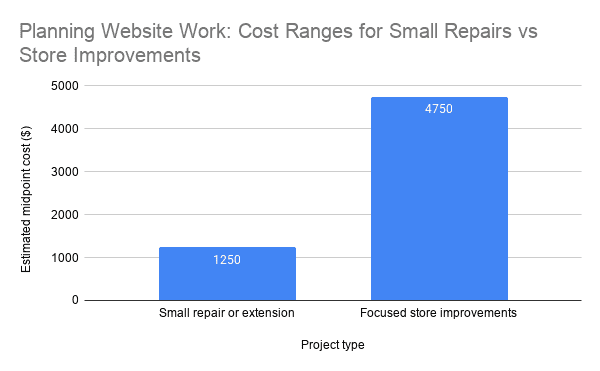
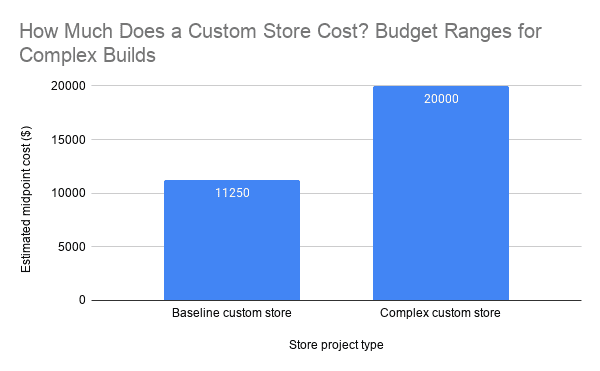
A new custom store commonly requires a larger budget. Projects involving original design, product migration, subscriptions, complex shipping, or external software may start around $7,500 and move beyond $25,000 as requirements grow.
Several factors drive the final cost:
- Number and complexity of products
- Custom design requirements
- Payment, accounting, inventory, and CRM integrations
- Data cleanup and product migration
- Shipping zones and tax rules
- Accessibility and compliance requirements
- Performance targets and hosting limitations
- Ongoing maintenance and support
Ask every WooCommerce development company to separate essential work from optional work. This approach lets you launch the functions that generate revenue first, then add lower-priority features when the business case supports them.
Watch for estimates that contain one vague line item. A useful proposal names the deliverables, assumptions, revision limits, testing process, payment schedule, and ongoing costs. You should know what you own and what happens after launch.
Cost also includes maintenance. Premium extensions renew, payment providers charge transaction fees, and stores need regular updates. Affordable development accounts for those costs before they become unpleasant surprises.
How can I tell whether a WooCommerce development company is reliable?
A polished portfolio does not prove technical skill. Screenshots cannot show checkout reliability, mobile speed, analytics accuracy, or the quality of the WordPress code underneath the design.
Start by asking for relevant examples. A company that understands local retail, professional services, subscriptions, or complex product catalogs should explain the business problem behind each project, not only show the finished homepage.
Next, review how the team investigates existing problems. A credible WooCommerce development company asks about revenue goals, customer complaints, order volume, payment failures, integrations, and internal workflows before suggesting features.
The firm should also review search risks. The Ahrefs SEO audit process highlights areas such as crawlability, indexation, internal links, and page performance. A redesign that ignores those areas can remove rankings that already produce sales.
Look for a clear delivery process:
- Discovery and store audit
- Written scope and priorities
- Development on a staging site
- Mobile, browser, payment, and checkout testing
- Migration and launch plan
- Training, documentation, and support
Ownership matters too. Confirm that your business controls the domain, hosting account, WordPress administrator access, analytics, payment gateways, extension licenses, and source files. A vendor should not trap your store inside accounts you cannot access.
Finally, test the quality of the advice. An experienced developer sometimes recommends removing features instead of adding them. Simpler stores usually cost less to maintain, load faster, and create fewer opportunities for checkout failure.
For a broader comparison of capabilities, review what professional WooCommerce developers should include before signing a proposal. This helps you compare the work itself rather than comparing prices without context.
What do performance and checkout data mean for a small business?
A slow store does more than frustrate visitors. It adds hesitation at the exact moment a customer decides whether to trust the business with payment information.
Google defines good Core Web Vitals as Largest Contentful Paint within 2.5 seconds, Interaction to Next Paint within 200 milliseconds, and Cumulative Layout Shift at 0.1 or less. Google evaluates these targets at the 75th percentile of page visits, according to its Core Web Vitals documentation.

These numbers create practical targets. Your store should display its main content quickly, respond promptly when shoppers select options, and avoid shifting buttons or totals while someone tries to click.
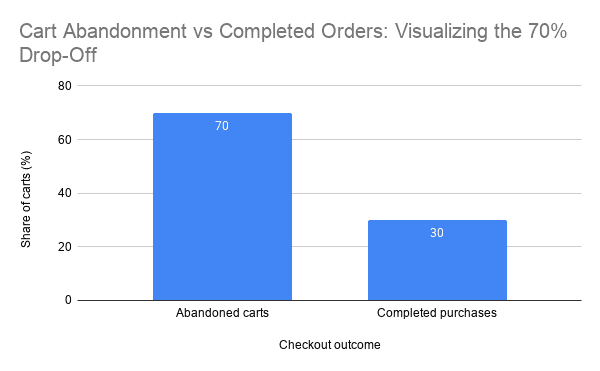
Checkout friction creates another major loss. Baymard Institute’s aggregated research reports an average documented cart abandonment rate of 70.19%. Not every abandoned cart comes from bad development, but unclear costs, forced accounts, errors, and complicated checkout flows contribute to the problem.
The HTTP Archive performance reports also show how page weight, requests, images, scripts, and other technologies behave across millions of websites. For a WooCommerce store, every unnecessary plugin or third-party script can add processing work and another potential failure point.
What does this mean for a small or local business? You cannot afford to waste qualified traffic. A large retailer may absorb a weak conversion rate, but a local store with limited traffic needs more visitors to complete their purchase.
A performance-focused WooCommerce development company should investigate:
- Oversized product images
- Slow hosting or limited server resources
- Unnecessary plugins and scripts
- Database bloat and expired transients
- Poor caching configuration
- Theme and page builder overhead
- Slow payment, shipping, or tracking integrations
- Layout shifts on product and checkout pages
Run tests on product, cart, and checkout templates instead of testing only the homepage. A structured process to check WordPress loading speed can reveal whether the problem comes from hosting, code, images, plugins, or external services.
Should I hire a local WooCommerce development firm near me?
Searching for “affordable WooCommerce development firms near me” usually reflects a communication problem. You want someone available, accountable, and familiar with how your local customers buy.
A local company can help when the project involves in-person discovery, local delivery, store pickup, regional taxes, or connections to existing business systems. Shared working hours also make launch support and urgent troubleshooting easier.
However, proximity does not guarantee quality. A nearby generalist may know WordPress but lack experience with payment workflows, product data, checkout testing, or WooCommerce performance.
Compare firms using the same standards, whether they work nearby or remotely. Review relevant experience, communication speed, technical process, ownership terms, and the plan for support after launch.
Local knowledge matters most when it changes the solution. A Bakersfield retailer may need regional delivery zones and local pickup, while a service provider may need deposits and appointment scheduling. A clear plan for building a local ecommerce website should connect those requirements to daily operations.
Ask who will complete the work. Some agencies sell locally but outsource development without explaining the arrangement. Outsourcing can work, but you need one accountable contact and a defined escalation path.
The best choice combines access with expertise. Hire the team that understands the store, communicates clearly, and can solve revenue-impacting problems without creating unnecessary complexity.
What should I ask before hiring a WooCommerce development company?
Weak projects often begin with weak questions. If the conversation focuses only on colors, pages, and launch dates, the team may miss the systems that control sales.
Start with business outcomes. Explain what currently costs you money, such as abandoned carts, manual order entry, failed payments, slow product pages, inaccurate inventory, or low search visibility.
Then ask the firm these questions:
- What problems do you see in the current store?
- Which improvements should we prioritize and why?
- Will you use custom code, extensions, or both?
- How will you test payments, taxes, shipping, emails, and refunds?
- How will you protect existing URLs and organic rankings?
- What Core Web Vitals targets will you use?
- Who owns the accounts, licenses, code, and design files?
- What happens if an update breaks checkout?
- How will we measure completed purchases and qualified leads?
Listen for specific answers. “We optimize everything” means little. A strong WooCommerce development company explains which templates it will test, which devices it will cover, and how it will verify that tracking records revenue correctly.
Security also needs a direct plan. Ask about backups, staging, access controls, software updates, malware monitoring, and recovery procedures. No developer can eliminate every risk, but the company should reduce avoidable exposure and respond quickly.
Request milestones tied to working outcomes. For example, approve store structure before design, test integrations before migration, and verify checkout before launch. This reduces rework and keeps the budget visible.
Finally, ask what the company would not build. Experienced developers identify expensive features that add maintenance without improving sales. That judgment often saves more money than a discounted hourly rate.
What are the key takeaways when comparing WooCommerce firms?
- Affordable does not mean cheapest. Compare total ownership cost, maintenance, and lost-sale risk.
- Demand a defined scope. The proposal should cover integrations, testing, performance, SEO, ownership, and support.
- Test revenue-critical pages. Product, cart, account, and checkout performance matter more than homepage appearance.
- Choose relevant experience. Your developer should understand your products, services, payment model, and operational needs.
- Measure business outcomes. Track completed orders, qualified leads, checkout errors, speed, and revenue instead of vanity metrics.
What do businesses commonly ask about WooCommerce development?
What does a WooCommerce development company do?
A WooCommerce development company builds, customizes, repairs, and maintains ecommerce stores on WordPress. Its work can include design, payments, shipping, subscriptions, integrations, speed, technical SEO, security, and checkout optimization.
Is WooCommerce suitable for a small business?
Yes. WooCommerce can support small retailers, local delivery businesses, wholesalers, and service companies. The setup must match the business model and avoid extensions that add cost without clear value.
How long does a WooCommerce project take?
Small repairs may take days, while focused improvements often take several weeks. A custom store with product migration and external integrations may require two to four months or longer.
Can a developer improve an existing WooCommerce store?
Yes. A skilled developer can repair checkout issues, replace weak plugins, improve speed, simplify workflows, and protect existing content. An audit should determine whether repair or replacement offers the better return.
Do I need ongoing WooCommerce maintenance?
Yes. WordPress, WooCommerce, themes, payment gateways, and extensions receive regular updates. Ongoing maintenance reduces security risk and helps catch checkout, email, or integration failures before they cause larger losses.
Is your current WooCommerce store helping customers buy or making them work harder?
A store can look professional and still lose money. Slow pages, confusing checkout steps, unreliable integrations, and poor tracking hide behind the design until customers leave.
The right WooCommerce development company starts with those problems. It finds the cause, sets clear priorities, and fixes the issues that affect traffic, orders, and operating costs.
Do not choose a firm because its estimate looks small. Choose one that can explain where revenue leaks, what it will change, and how it will prove the result.
If you are unsure whether your store needs a repair, redesign, or complete rebuild, schedule a website strategy consultation. A focused review can identify the costly problems first, so you invest in the work that improves speed, conversions, and long-term reliability.
🎥 Featured WordPress Video
🏆 Top 3 Most Watched Videos

Ray Eason is a WordPress developer and SEO strategist with over 20 years of experience helping businesses build fast, secure, and high-converting websites. As the founder of Reason Hosting, he specializes in WordPress performance, local SEO, and lead generation for small to mid-sized businesses, including real estate and dental practices. His focus is simple, help businesses rank higher, load faster, and convert more visitors into customers.
Need help with your website? Get a free SEO audit or request a custom quote.
About Reason Hosting
We help Bakersfield businesses grow with WordPress design, SEO, hosting, and performance optimization. Learn how to rank higher, load faster, and convert more visitors into leads.
Get a Free WordPress SEO Audit
Get WordPress Growth Tips
More from our blog
See all posts


Recent Posts
- Which Companies Offer WooCommerce Development Services? November 1, 2026
- WordPress Agency California: What Will Your Site Cost? October 16, 2026
- Is a WooCommerce Development Company Near Me Affordable? October 10, 2026