

Where Can You Buy WordPress Web Hosting With Free SSL?
Where to Buy Reliable WordPress Hosting With Free SSL Certificates
Your website can look professional and still lose customers before the first page loads. A missing SSL certificate triggers security warnings, weakens trust, and can stop visitors from submitting a contact form.
The problem often starts with cheap hosting that treats security, backups, and performance as paid extras. A low monthly price becomes expensive when the site slows down, breaks, or stops generating leads.
WordPress web hosting with free SSL combines a server optimized for WordPress with an included certificate that encrypts data between your website and each visitor’s browser. The right provider also installs, activates, and renews that certificate automatically.
This guide explains where to buy WordPress hosting with free SSL certificates and how to compare plans. It also covers speed, SEO, migration, security, and the business outcomes that hosting should support.
Where should you buy WordPress web hosting with free SSL?
Buy WordPress web hosting from a provider that includes automatic SSL installation, certificate renewal, backups, malware protection, and WordPress support. The certificate should cover your primary domain, the www version, and any required subdomains.
Small businesses usually need managed hosting rather than an unmanaged server. Managed hosting reduces technical work because the provider handles server updates, caching, monitoring, and common configuration problems.
Reason Hosting provides managed WordPress hosting for small businesses that need speed, security, and practical support. Free SSL setup removes one more technical task from your team’s workload.
Local support also matters when a website produces calls, bookings, or quote requests. A generic support script will not help much when a plugin conflict takes down a critical service page.
Before choosing a provider, confirm these essentials:
- Automatic SSL certificate installation and renewal
- Server-level page caching
- Daily off-site backups with simple restoration
- Current PHP and database support
- Malware scanning and firewall protection
- WordPress migration assistance
- Clear resource and traffic limits
- Support from people who understand WordPress
A free certificate alone does not make a weak hosting plan worthwhile. Choose the hosting environment first, and then confirm that SSL comes standard without hidden renewal charges.
How can you tell whether the free SSL certificate is truly included?
Some providers advertise free SSL but leave the installation to the customer. Others include the first certificate but charge for support, renewal, or fixing mixed-content errors.
Ask whether the host activates SSL automatically after connecting your domain. The provider should also force HTTP traffic to HTTPS and renew the certificate before it expires.
A standard domain-validated certificate provides strong encryption for most local and service-based websites. Most small businesses do not need an expensive certificate simply to secure contact forms, landing pages, or online payments.
However, SSL only protects data in transit. It does not remove malware, update plugins, strengthen passwords, or repair vulnerable WordPress themes.
Review the full security process, not just the certificate badge:
- Does the plan enable HTTPS across every page?
- Will the provider fix mixed-content warnings?
- Does the certificate renew automatically?
- Are both the root and www domains covered?
- Does the host monitor certificate failures?
- Can support restore a clean backup after an attack?
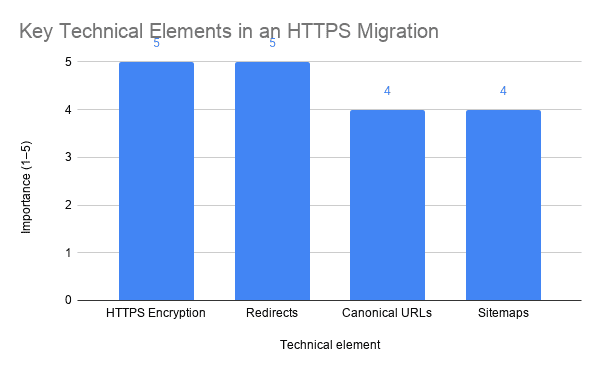
Google strongly recommends HTTPS because it protects the integrity and confidentiality of website traffic. Its HTTPS guidance for site owners also explains how redirects, canonical URLs, and sitemaps should work during a conversion.
Will better hosting and free SSL improve SEO?
HTTPS creates a secure foundation, but it cannot replace useful content or sound technical SEO. Google uses HTTPS as a ranking signal, while speed and page experience can also influence how users interact with your website.
Hosting affects how quickly the server begins delivering a page. Slow database queries, overloaded servers, and weak caching increase response times before the browser can display meaningful content.
Google’s Core Web Vitals documentation sets clear performance benchmarks. A strong website targets Largest Contentful Paint within 2.5 seconds, Interaction to Next Paint within 200 milliseconds, and Cumulative Layout Shift below 0.1.
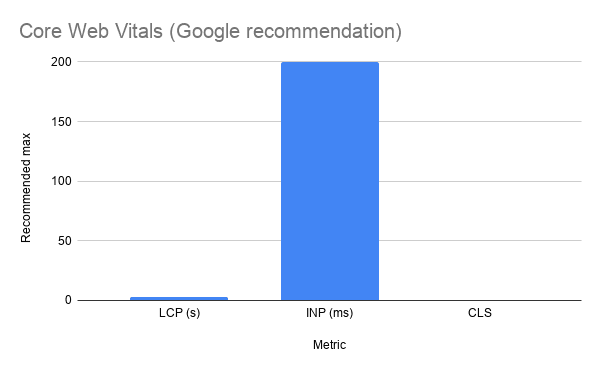
Google evaluates those results at the 75th percentile of page visits. That means your site must perform well for most visitors, including people using mobile connections and slower devices.
Hosting cannot fix every Core Web Vitals problem. Large images, excessive scripts, poor themes, and heavy page builders can still slow down a powerful server.
Start with solid hosting, and then test the complete website. This guide to checking WordPress loading speed explains how to find delays that a hosting upgrade alone may not solve.
What do the performance benchmarks mean for a small business website?
A 2.5-second LCP target means the main content should appear quickly enough to keep a potential customer engaged. If the hero image, booking form, or service headline takes longer, visitors may leave before understanding the offer.

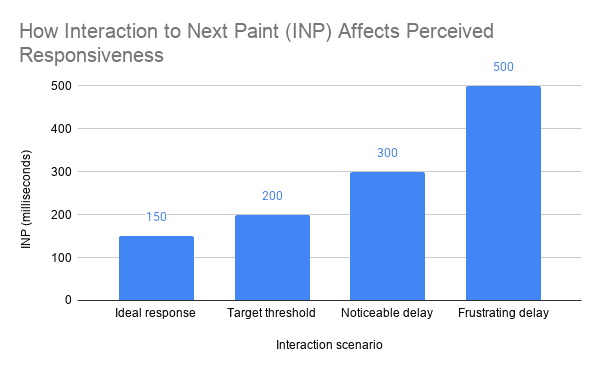
An INP target below 200 milliseconds measures responsiveness. When someone taps a menu, opens a form, or selects a service, the website should respond without a noticeable delay.
A CLS score below 0.1 protects visual stability. Buttons, phone numbers, and form fields should not jump while the page loads because unexpected movement causes frustration and accidental clicks.
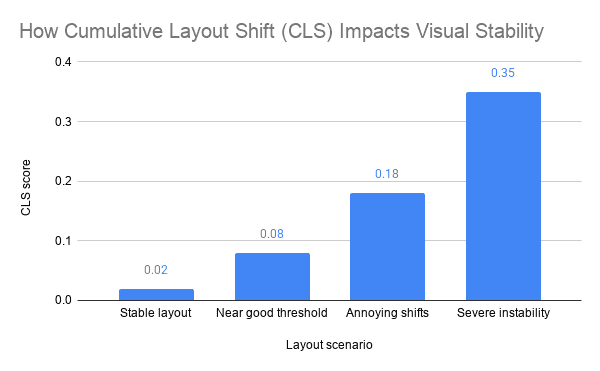
The HTTP Archive Core Web Vitals report tracks real-world performance trends across a large collection of websites. Its data shows why performance requires ongoing attention rather than a one-time speed test.
For a local business, these metrics connect directly to revenue opportunities. A faster service page gives more visitors a fair chance to call, request a quote, or schedule an appointment.
Speed also affects paid traffic. Sending ad visitors to a slow website wastes budget because the business pays for clicks that never become meaningful visits.
What should a WordPress hosting plan include besides free SSL?
Free SSL protects browser connections, but reliable WordPress web hosting needs several additional safeguards. Without them, one failed update or infected plugin can interrupt lead generation for hours.
Daily backups should run automatically and remain separate from the main server. Otherwise, a server failure could damage both the website and its only backup.
A staging environment also reduces risk. Your team can test WordPress updates, design changes, and new plugins before pushing them to the live website.
Look for the following operational features:
- Automated daily backups
- One-click or assisted restoration
- Server and application firewalls
- Malware monitoring
- WordPress core update support
- Staging or development environments
- Uptime and certificate monitoring
- Access to error logs
- Content delivery network compatibility
Maintenance still matters after the site goes live. A structured WordPress maintenance plan helps prevent outdated plugins, broken forms, and database problems from becoming expensive emergencies.
Support quality deserves equal attention. Ask whether support can diagnose WordPress, database, DNS, SSL, and caching issues instead of simply confirming that the server remains online.
How do you compare WordPress hosting prices without choosing the wrong plan?
The cheapest advertised rate rarely shows the full cost. Renewal increases, backup fees, migration charges, and paid security add-ons can turn an inexpensive plan into a poor long-term decision.
Compare the total annual cost rather than the introductory monthly price. Include SSL, backups, email needs, migration, staging, security, and support in that calculation.
Next, check resource limits. Some WordPress web hosting plans restrict storage, monthly visits, PHP workers, bandwidth, or database usage, but they explain those limits only in the fine print.
A small brochure website may work well on a modest managed plan. However, a WooCommerce store, membership website, or high-traffic lead generation site needs more database capacity and processing power.
The best value comes from preventing lost business, not from saving a few dollars each month. One missed appointment or failed quote request can exceed the difference between weak hosting and dependable hosting.
When comparing plans, use this order:
- Confirm automatic SSL installation and renewal.
- Review server speed and caching.
- Check backup frequency and restoration support.
- Understand traffic and resource limits.
- Verify migration assistance.
- Evaluate WordPress-specific support.
- Calculate the full renewal cost.
For a closer look at the relationship between price and performance, review these fast WordPress hosting considerations. The right decision balances speed, support, security, and predictable costs.
Can hosting improve leads and conversions, or does it only affect speed?
Hosting affects conversions because every customer journey starts with a working page. If the website loads slowly, shows a security warning, or fails during a form submission, the visitor cannot become a lead.
HTTPS also supports confidence. Customers expect a secure connection before sharing names, phone numbers, email addresses, payment details, or health-related information.
However, faster WordPress web hosting will not repair a confusing message or weak call to action. It creates the stable foundation that allows your design, content, local SEO, and landing pages to work properly.
Technical SEO research also treats HTTPS, crawlability, mobile performance, and page speed as connected parts of website health. The Ahrefs technical SEO guide provides a useful framework for reviewing these factors together.
Measure business outcomes after changing hosts. Track completed forms, phone calls, bookings, checkout completions, and qualified traffic rather than relying only on a single speed score.
If traffic stays steady but conversions improve, the faster and more reliable experience may be helping. If conversions remain weak, investigate the page layout, offer, form friction, and search intent next.
How can you move WordPress hosting without downtime or lost rankings?
A rushed migration can create broken pages, missing images, email disruption, and search indexing problems. The risk comes from changing files, databases, DNS records, and HTTPS settings without a controlled process.
Start with a complete backup of the current website. Then copy the files and database to the new server while the original site remains live.
Test the migrated website before changing DNS. Check contact forms, login pages, payment functions, images, internal links, tracking scripts, and mobile layouts.
After testing, activate the SSL certificate on the new server. Confirm that every HTTP URL redirects to its matching HTTPS version with a permanent redirect.
The migration checklist should include:
- Full file and database backup
- PHP and WordPress compatibility review
- Pre-launch staging test
- SSL activation before the DNS change
- HTTP-to-HTTPS redirects
- Form and checkout testing
- Analytics and conversion tracking verification
- Sitemap and canonical URL review
- Uptime monitoring after launch
Keep the old hosting account active until the DNS change finishes and the new website passes final testing. This overlap provides a safe fallback if an unexpected problem appears.
Reason Hosting can handle the technical sequence and reduce migration risk. That matters when your website supports active campaigns, appointment requests, or local search traffic that cannot simply pause.
What are the key takeaways when choosing hosting with free SSL?
- Free SSL should work automatically. The host should install, activate, monitor, and renew the certificate without manual intervention.
- Managed hosting fits most small businesses. It reduces technical work and provides help with WordPress-specific problems.
- Speed affects real business outcomes. A faster site gives more visitors an opportunity to read, call, book, or request a quote.
- SSL does not replace website security. You still need backups, updates, malware protection, strong passwords, and careful plugin management.
- Total cost matters more than the introductory price. Compare renewal rates, support, migration, backups, and resource limits.
What do businesses ask about WordPress hosting and free SSL?
Is a free SSL certificate safe for a business website?
Yes. A properly configured domain-validated SSL certificate provides strong encryption for standard business websites, contact forms, and online stores. Security still requires updates, backups, monitoring, and safe WordPress administration.
Does WordPress include a free SSL certificate?
WordPress software does not issue the certificate. Your hosting provider must supply and configure SSL for the domain.
Do free SSL certificates renew automatically?
They should, but the host controls that process. Confirm automatic renewal and certificate monitoring before purchasing a plan.
Will switching to HTTPS improve Google rankings?
Google uses HTTPS as a lightweight ranking signal, but SSL alone will not create strong rankings. Content quality, technical SEO, links, mobile usability, and page performance still matter.
Can I move an existing WordPress site to hosting with free SSL?
Yes. A controlled migration can move the files, database, domain, and HTTPS configuration with little or no downtime. Test the site before updating DNS and keep the old hosting active during the transition.
Is your current hosting protecting the business or holding it back?
Hosting problems rarely stay technical. Slow pages reduce engagement, security warnings damage trust, and unreliable forms quietly remove potential leads from the pipeline.
The right WordPress web hosting plan gives your website a secure and stable foundation. Free SSL should come standard, but so should dependable backups, performance controls, monitoring, and knowledgeable support.
If you are unsure whether hosting, plugins, or page structure causes the problem, start with evidence. A website strategy consultation can identify the bottlenecks and show which fixes will improve speed, search visibility, and conversions.
Your hosting bill may look small. The real question is how much a slow or unreliable website costs every month in missed calls, abandoned forms, and customers who never return.
🎥 Featured WordPress Video
🏆 Top 3 Most Watched Videos

Ray Eason is a WordPress developer and SEO strategist with over 20 years of experience helping businesses build fast, secure, and high-converting websites. As the founder of Reason Hosting, he specializes in WordPress performance, local SEO, and lead generation for small to mid-sized businesses, including real estate and dental practices. His focus is simple, help businesses rank higher, load faster, and convert more visitors into customers.
Need help with your website? Get a free SEO audit or request a custom quote.
About Reason Hosting
We help Bakersfield businesses grow with WordPress design, SEO, hosting, and performance optimization. Learn how to rank higher, load faster, and convert more visitors into leads.
Get a Free WordPress SEO Audit
Get WordPress Growth Tips
More from our blog
See all posts




Recent Posts
- Which Companies Offer WooCommerce Development Services? November 1, 2026
- WordPress Agency California: What Will Your Site Cost? October 16, 2026
- Is a WooCommerce Development Company Near Me Affordable? October 10, 2026