

WordPress Maintenance Plans Bakersfield: Which Is Best?
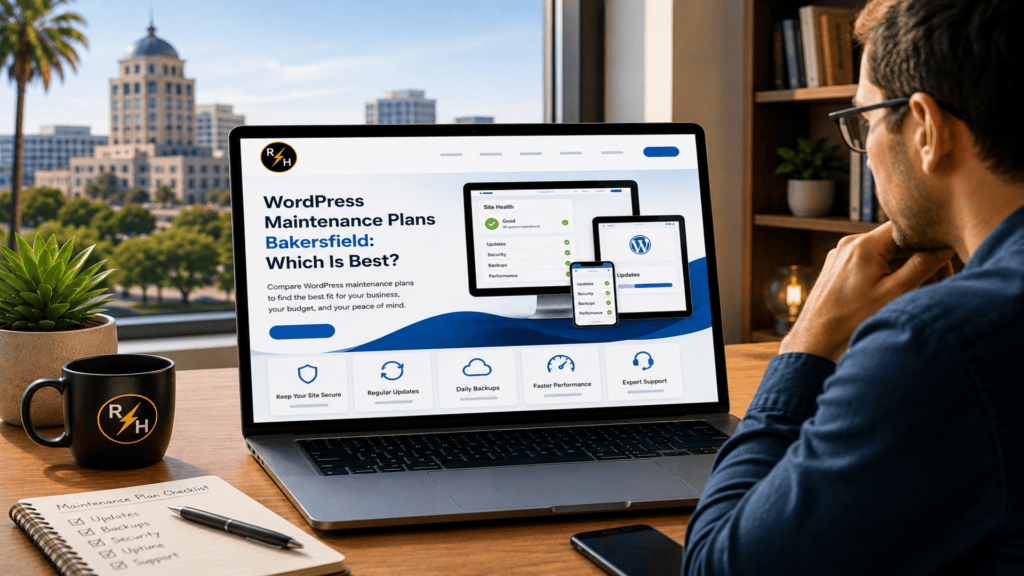
Reliable WordPress Maintenance Plans Bakersfield Businesses Can Use to Protect Leads
Your website can look fine while problems build underneath it. A plugin stops sending form notifications. An update creates a mobile layout error. Pages slow down, rankings slip, and potential customers leave before calling.
A WordPress maintenance plan is a recurring process that keeps your website updated, secure, backed up, fast, and functional. It also catches small issues before they affect traffic, leads, or revenue.
That distinction matters. WordPress maintenance plans in Bakersfield should do more than install updates. They should protect the systems that connect local customers to your business.
This guide explains what a useful plan includes, what it should prevent, and how to choose the right level of support. You will also learn how website maintenance affects SEO, conversions, security, and daily operations.
Why does my Bakersfield business need ongoing WordPress maintenance?
What happens when routine website problems go unnoticed?
WordPress websites change constantly. The core software, plugins, themes, PHP environment, and third-party connections all receive updates. As a result, a website that works today may develop problems next week.
Small failures often stay hidden. A contact form may show a success message but fail to deliver the lead. An appointment calendar may stop loading on mobile, while an outdated phone number continues appearing in the footer.
These issues cost money because they interrupt customer action. A visitor cannot request an estimate, schedule an appointment, or complete a purchase. Meanwhile, the business owner may not know anything is wrong.
Ongoing maintenance creates a repeatable inspection process. It checks the website after updates and monitors the functions that support leads. That process should cover more than the homepage.
- Contact forms and notification emails
- Mobile navigation and tap-to-call buttons
- Appointment and reservation systems
- Checkout, payment, and account pages
- Analytics and conversion tracking
- SSL certificates, uptime, and domain connections
For local service companies, prevention costs less than emergency repair. A structured plan also reduces the chance that an employee, freelancer, or automated update will create a larger problem.
Businesses that need a closer look at available support can review these managed WordPress maintenance options. The goal is not more technical activity. The goal is fewer interruptions and fewer lost leads.
What should WordPress maintenance plans in Bakersfield include?
Which monthly tasks actually protect the website?
A useful plan should combine updates, backups, security, performance checks, and functional testing. Updates alone do not provide enough protection because updates can also cause conflicts.
The provider should create a recent backup before making significant changes. Then the provider should check important pages and features after the update. High-risk changes may require a staging environment first.
Every WordPress maintenance plan should clearly define its scope. Look for specific tasks, response times, backup schedules, and support limits instead of vague promises about “website care.”
- WordPress updates: Core, plugin, and theme updates with compatibility checks.
- Backups: Automated offsite copies with a clear retention period.
- Restore testing: Verification that the website can recover from a usable backup.
- Security monitoring: Malware scans, login protection, and suspicious file checks.
- Uptime monitoring: Alerts when the website becomes unavailable.
- Performance reviews: Checks for slow pages, oversized images, and database problems.
- Lead testing: Confirmation that forms, calls, bookings, and payments work.
- Reporting: A short record of updates, findings, and completed fixes.
Support boundaries also matter. Ask whether the plan includes content edits, broken layout repairs, plugin setup, and development time. Otherwise, a low monthly price may cover monitoring but not the work needed to fix a problem.
Some websites need code changes rather than routine maintenance. In that case, an experienced WordPress developer in Bakersfield can repair the underlying theme, plugin, or integration instead of repeatedly treating the symptom.
A good plan makes ownership clear. You should know who monitors the website, who receives alerts, and how quickly critical issues receive attention.
How do updates, backups, and security checks prevent expensive failures?
Why is clicking “update all” not a maintenance strategy?
Updates close security gaps and improve compatibility. However, they can also change scripts, database structures, and theme behavior. One incompatible plugin can break a form, menu, checkout, or page builder.
A safer process starts with a backup. Next, the maintenance provider applies updates in a controlled order and reviews the website afterward. Critical business functions receive direct testing.
Backups need more than a green status icon. They should remain separate from the main hosting account, because a server failure or account compromise can affect local backup files. A provider should also know how to restore the site quickly.
Security monitoring adds another layer. It should watch for unexpected file changes, malicious code, repeated login attempts, and outdated software. However, no tool can remove all risk, so fast detection and recovery remain essential.
Access controls matter too. Each administrator should use a separate account, strong password, and appropriate permission level. Former employees and unused contractor accounts should lose access promptly.
For dentists, contractors, attorneys, property professionals, and other service businesses, website downtime creates immediate friction. Customers rarely wait for a broken site to recover. They return to Google and choose another result.
Maintenance cannot guarantee that nothing will fail. It can reduce exposure, shorten recovery time, and prevent a manageable technical issue from becoming a business emergency.
Can WordPress maintenance improve website speed, SEO, and conversions?
How does technical upkeep affect search visibility and customer action?
Yes. Maintenance can improve speed and SEO when it addresses the causes of poor performance. Those causes often include bloated plugins, oversized images, database clutter, weak caching, and slow hosting.
Google’s Core Web Vitals documentation defines three important experience benchmarks. Largest Contentful Paint should reach 2.5 seconds or less, Interaction to Next Paint should stay at 200 milliseconds or less, and Cumulative Layout Shift should remain at 0.1 or less.
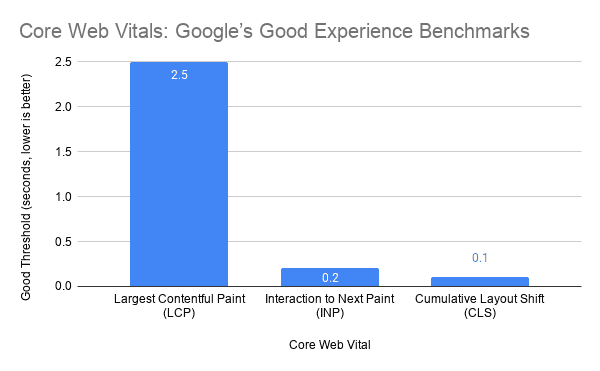
Passing those benchmarks does not guarantee high rankings. However, slow or unstable pages can frustrate visitors and reduce the value of your SEO work. Performance also affects how easily mobile users can call, submit a form, or navigate between services.
Technical maintenance supports SEO in several practical ways:
- Finds broken internal and external links
- Prevents accidental indexing and robots.txt errors
- Checks redirects after page or URL changes
- Removes outdated plugins that add unnecessary code
- Monitors mobile layouts and interactive elements
- Protects analytics and conversion tracking scripts
The Ahrefs WordPress SEO guide also highlights how site structure, speed, internal linking, and technical configuration work together. Maintenance preserves that foundation after the initial SEO work ends.
Start with measurement instead of random optimization. A structured process to test WordPress site speed can separate hosting delays from page-level problems such as images, scripts, and plugin requests.
Hosting still matters. If the server responds slowly or struggles during traffic spikes, plugin cleanup will only go so far. Moving to performance-focused WordPress hosting may solve the bottleneck that maintenance alone cannot remove.
What do website performance benchmarks mean for a local business?
How should Bakersfield companies interpret speed and user experience data?
Performance data matters when it explains customer friction. A slower page gives a visitor more time to abandon the search, lose confidence, or tap a competitor’s listing. The risk grows on mobile connections.
The Google thresholds provide a useful operating target. If the main content takes longer than 2.5 seconds to appear, users may perceive the page as slow. If an interaction takes more than 200 milliseconds to respond, the website can feel unresponsive.
Nielsen Norman Group’s research on response-time limits identifies 0.1 second, 1 second, and 10 seconds as key perception thresholds. Responses near 0.1 second feel immediate, while longer delays interrupt attention and increase uncertainty.

However, a score without context can mislead. A perfect test result has limited value if the quote form fails. Likewise, shaving a few milliseconds from a blog post may matter less than fixing a slow service page that generates sales calls.
The HTTP Archive performance reports track page weight, requests, images, and other web metrics across millions of sites. The broader lesson is clear. Modern pages carry many resources, so every additional plugin, font, image, and tracking script creates another performance decision.
For a local business, prioritize pages closest to revenue:
- Homepage and primary service pages
- Location and contact pages
- Appointment or estimate request pages
- Paid advertising landing pages
- Checkout or payment pages
Measure real outcomes alongside technical scores. Track completed forms, qualified calls, bookings, purchases, and lead quality. Website maintenance should improve the path to conversion, not just produce a better-looking report.
How do I choose the right WordPress maintenance plan for my business?
Which questions reveal whether a provider can protect leads?
Start with the cost of failure. A brochure website with one contact form needs less coverage than a dental booking site, membership portal, online store, or high-volume lead generation website.
Next, review how often the business changes content and features. Frequent promotions, staff updates, service changes, and landing pages increase the chance of errors. More activity usually requires more testing and support time.
Ask each provider direct questions before choosing a plan:
- How often do you update WordPress, plugins, and themes?
- Do you test forms, calls, bookings, and payments?
- Where do you store backups, and how long do you keep them?
- Have you tested the restore process?
- What happens when an update breaks the website?
- How quickly do you respond to downtime or security alerts?
- Does the plan include repair time or only monitoring?
- Will I receive a clear report about completed work?
Then choose coverage based on business risk. A basic plan may fit a small informational site. A growth plan should add performance reviews, form testing, and content support, while a critical plan may require staging, frequent backups, and priority response.
Be careful with plans that promise unlimited support without defining the work. Also avoid providers who update the site without backups or post-update testing. Low-cost maintenance becomes expensive when no one accepts responsibility for recovery.
Finally, confirm that the plan can address the real problem. Maintenance will not fix poor positioning, weak landing pages, or missing search content by itself. A WordPress SEO performance review can identify whether technical maintenance, content, hosting, or conversion issues deserve priority.
The right provider should explain the problem in plain language. You should understand what failed, why it happened, and what will prevent it from happening again.
What are the key takeaways for Bakersfield business owners?
- Maintenance protects revenue paths. Forms, phone links, bookings, and payments need regular testing.
- Updates require control. Back up the site, update carefully, and inspect important functions afterward.
- Speed affects more than rankings. Slow and unstable pages create friction before a customer contacts you.
- Backups need a recovery plan. A stored file has little value if no one can restore it quickly.
- Choose coverage based on risk. A lead generation website needs more oversight than a simple informational site.
Frequently asked questions about WordPress maintenance plans in Bakersfield
How much does a WordPress maintenance plan cost?
Pricing depends on website complexity, backup frequency, update risk, response time, and included repair work. A small service website usually needs less support than an online store, booking system, or membership site.
How often should a WordPress website receive maintenance?
Monitoring should run continuously, while updates and functional checks should occur on a defined schedule. High-risk websites may need daily backups, frequent reviews, and immediate uptime alerts.
Does managed WordPress hosting replace website maintenance?
No. Managed hosting can improve server performance, backups, and security, but it may not test forms, layouts, payments, tracking, or third-party integrations. Hosting and maintenance solve related but different problems.
Can I maintain my WordPress website myself?
Yes, if you can manage backups, updates, security, testing, and recovery consistently. However, business owners should consider the time required and the cost of missing a failed form or broken update.
Will WordPress maintenance improve my Google rankings?
Maintenance supports rankings by protecting speed, crawlability, mobile usability, links, and technical SEO. It cannot replace useful content, local authority, or a clear search strategy.
Is your website quietly costing you leads?
A neglected website rarely fails all at once. It becomes slower, less reliable, and harder to use until customers start leaving without telling you why.
Reliable WordPress maintenance prevents that decline. It keeps the website secure, tests the actions that generate business, and gives you a clear recovery path when something breaks.
If your site feels slow, misses form notifications, or depends on plugins no one monitors, the problem deserves a structured review. A practical website strategy consultation can identify what needs maintenance, what needs repair, and what may already be costing you traffic and conversions.
🎥 Featured WordPress Video
🏆 Top 3 Most Watched Videos

Ray Eason is a WordPress developer and SEO strategist with over 20 years of experience helping businesses build fast, secure, and high-converting websites. As the founder of Reason Hosting, he specializes in WordPress performance, local SEO, and lead generation for small to mid-sized businesses, including real estate and dental practices. His focus is simple, help businesses rank higher, load faster, and convert more visitors into customers.
Need help with your website? Get a free SEO audit or request a custom quote.
About Reason Hosting
We help Bakersfield businesses grow with WordPress design, SEO, hosting, and performance optimization. Learn how to rank higher, load faster, and convert more visitors into leads.
Get a Free WordPress SEO Audit
Get WordPress Growth Tips
More from our blog
See all posts




Recent Posts
- Is a WooCommerce Development Company Near Me Affordable? October 10, 2026
- Where Can You Buy WordPress Web Hosting With Free SSL? September 17, 2026
- Looking for Affordable Web Hosting Bakersfield? August 24, 2026