

Affordable Bakersfield WordPress Maintenance Plans

Affordable Bakersfield WordPress Maintenance Plans That Protect Leads, Speed, and Revenue
A broken WordPress site does not always look broken. Sometimes it loads slowly, drops rankings, loses form submissions, or scares visitors away before they call.
That is the real problem. Your website may still be online, but it may not be helping your business grow.
Bakersfield WordPress maintenance means the ongoing work required to keep a WordPress website secure, fast, updated, backed up, optimized, and ready to convert visitors into leads. It includes software updates, security monitoring, performance checks, technical SEO review, backups, uptime monitoring, and small fixes before they become expensive problems.
For local businesses, this matters because your website often makes the first impression. If it loads slowly, breaks on mobile, or ranks poorly, you lose calls, bookings, quote requests, and trust.
This guide explains what affordable WordPress maintenance plans should include, why local Bakersfield businesses need them, how pricing works, and how to choose a plan that protects the outcomes that matter. More leads. Faster pages. Fewer emergencies. Less wasted spend.
Bakersfield WordPress Maintenance Starts With the Problem

Most WordPress problems start quietly
WordPress issues rarely appear all at once. A plugin update conflicts with your theme. An image gets uploaded without compression. A contact form stops sending leads. Then traffic drops, conversions slow down, and no one knows exactly when the problem started.
This happens because WordPress depends on many moving parts. Themes, plugins, PHP versions, hosting, caching, security rules, forms, tracking scripts, and SEO settings all need to work together. When one part falls behind, the whole site can suffer.
Affordable Bakersfield WordPress maintenance helps prevent that chain reaction. Instead of waiting for the site to break, maintenance checks the system regularly and fixes problems early. That saves money because emergency repairs usually cost more than steady upkeep.
For a service-based business, the cost of neglect can show up fast. One broken form can erase a week of leads. One slow landing page can waste paid ad traffic. One hacked page can damage trust with both visitors and Google.
Good maintenance focuses on business risk, not busywork. The goal is not to “manage plugins.” The goal is to keep your website generating traffic, calls, and form submissions without avoidable downtime.
What an Affordable WordPress Maintenance Plan Should Include
The right plan protects security, speed, SEO, and conversions
A low-cost plan only helps if it covers the work that actually protects your business. Cheap maintenance that only clicks “update” once a month can miss the problems that cost you leads. Updates matter, but they are only one part of the job.
A strong maintenance plan should include core WordPress updates, theme updates, plugin updates, scheduled backups, malware scanning, uptime monitoring, speed checks, and basic technical SEO review. It should also include time for small fixes because small issues often become large ones when ignored.
Security comes first because WordPress sites face constant automated attacks. Weak passwords, outdated plugins, abandoned themes, and poor hosting settings create openings. A maintenance plan should reduce those openings before they turn into downtime or spam redirects.
Performance comes next because speed affects user experience and conversions. Google explains that Core Web Vitals measure real user experience through metrics like Largest Contentful Paint, Interaction to Next Paint, and Cumulative Layout Shift in its Core Web Vitals documentation. In simple terms, your site needs to load fast, respond quickly, and stay visually stable.
SEO maintenance also matters because technical problems can block growth. Broken links, missing metadata, indexing issues, redirect errors, and slow templates can reduce search visibility. If your site already struggles to rank locally, a WordPress SEO audit can reveal whether maintenance issues are part of the problem.
- WordPress core, theme, and plugin updates
- Daily or weekly backups with restore testing
- Security scans and malware monitoring
- Uptime checks and error monitoring
- Speed review and caching checks
- Basic technical SEO health checks
- Form testing and conversion path review
- Small content or layout fixes each month
Why Bakersfield WordPress Maintenance Matters for Local Businesses
Local customers do not wait for slow or broken websites
Local search moves fast. A customer searches for a roofer, dentist, attorney, contractor, restaurant, salon, or repair company, and they compare options in seconds. If your site loads slowly or looks broken, they go back to Google and choose another business.
That is why Bakersfield WordPress maintenance connects directly to revenue. Your website supports local SEO, paid ads, social media, referrals, and repeat customers. When it fails, every marketing channel loses efficiency.
Many small businesses assume website maintenance only matters after something breaks. But by then, the damage has already started. Search rankings may drop, customers may lose trust, and paid traffic may convert poorly because the site experience does not support the offer.
Google’s guidance on search performance makes one point clear. Helpful, accessible, well-functioning pages give users a better experience, and Google’s Search Central documentation gives site owners direct guidance on crawlability, indexing, structured data, and page quality. Maintenance keeps those basics from drifting.
For Bakersfield service businesses, maintenance should also include local search checks. Your service pages, contact forms, phone links, location signals, and Google Business Profile connections all affect how easy it is for customers to find and contact you. If local visibility is weak, focused local search optimization can work alongside maintenance to improve rankings and calls.
The question is simple. Can your website handle the next person who is ready to buy? If the answer feels uncertain, maintenance is not optional. It is part of protecting your lead flow.
Affordable Bakersfield WordPress Maintenance Plans and Pricing
Choose the plan based on risk, traffic, and business value
Affordable does not mean minimal. It means the plan matches the risk and value of your website. A simple brochure site needs a different maintenance plan than a high-traffic lead generation site with landing pages, tracking scripts, and paid ad campaigns.
Most Bakersfield WordPress maintenance plans fall into three practical levels. Basic maintenance protects simple sites. Growth maintenance supports active marketing sites. Performance maintenance helps businesses that depend heavily on SEO, ads, and conversions.
A basic plan usually includes updates, backups, security scans, and uptime monitoring. This works for smaller businesses with low content changes and simple functionality. It reduces risk, but it may not include deeper SEO or performance work.
A growth plan adds speed review, form testing, monthly reporting, small fixes, and basic technical SEO checks. This fits local service businesses that rely on organic search, referrals, and lead forms. It keeps the site stable while supporting steady marketing activity.
A performance plan goes further. It may include Core Web Vitals monitoring, database cleanup, advanced caching review, conversion path checks, landing page testing, and deeper technical fixes. If you run ads or depend on your website for booked appointments, this level often pays for itself.
- Basic maintenance: Best for simple local business websites that need protection and updates.
- Growth maintenance: Best for service businesses that need speed, SEO health, and lead form reliability.
- Performance maintenance: Best for companies using SEO, paid ads, and landing pages to generate leads.
Hosting also affects maintenance cost. Slow or unstable hosting creates problems that maintenance alone cannot fully fix. If your site struggles with speed or uptime, moving to managed WordPress hosting can remove a major source of recurring issues.
The Data Behind WordPress Speed, SEO, and Maintenance
What the numbers mean for small business WordPress SEO websites
Data makes the maintenance decision clearer. Google recommends a Largest Contentful Paint of 2.5 seconds or faster, an Interaction to Next Paint of 200 milliseconds or less, and a Cumulative Layout Shift score below 0.1. These numbers matter because they reflect how real users experience your site.
For a local business, that means your homepage, service pages, and landing pages should load quickly and respond without delay. A visitor on a phone should not have to wait, tap twice, or fight shifting buttons. Every extra moment creates friction.
HTTP Archive tracks real-world web performance across millions of pages, and its page weight reports show how large modern websites have become. Many pages now carry heavy images, scripts, fonts, and third-party tools. WordPress sites often slow down because those assets pile up over time.
Ahrefs found that 96.55% of pages get no organic traffic from Google. That does not mean every page fails because of maintenance. But it does show how competitive search has become, and weak technical foundations make the climb harder.
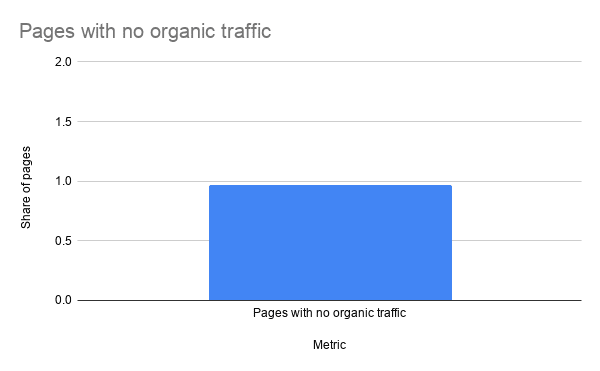
Here is what this means for small and local business WordPress SEO websites. You cannot rely on content alone if the site loads poorly, breaks on mobile, or blocks search engines from crawling key pages. SEO growth needs a stable technical base.
Maintenance protects that base. It keeps the site clean, fast, secure, crawlable, and usable so your content and local SEO work can perform. Without that foundation, you may spend more on marketing while getting less from every visitor.
How Bakersfield WordPress Maintenance Improves Conversions
Maintenance should protect the path from visit to lead
Traffic means little if visitors do not contact you. A well-maintained WordPress site makes the next step obvious. It keeps phone buttons working, forms sending, pages loading, and calls to action easy to find.
Conversion problems often hide inside small details. A form confirmation fails. A mobile button sits too low. A page loads slowly after a tracking script changes. A plugin update shifts the layout on a service page.
Regular maintenance catches these problems before they drain revenue. It also creates a habit of checking what matters. Not just uptime, but whether the website still helps a real customer take action.
Landing pages need special attention because they often carry paid traffic. If a page loads slowly or has a weak layout, ad spend leaks. In that case, improve landing page conversions before increasing the budget.
Mobile experience deserves the same focus. Many local searches happen on phones, and mobile visitors want fast answers. They need your services, location, phone number, proof, and contact options without digging.
Ask a direct question. If someone visits your site today, can they understand what you do, trust you, and contact you in under one minute? If not, maintenance should include conversion checks, not just software updates.
Common WordPress Maintenance Problems in Bakersfield
The same issues appear again and again
Most WordPress maintenance problems follow familiar patterns. Businesses install too many plugins, ignore updates, use cheap shared hosting, upload large images, skip backups, and never test forms. None of these choices look dangerous at first.
Over time, they create drag. Pages slow down. Admin screens freeze. Security risks increase. Search engines crawl fewer pages. Visitors leave before they see the offer.
Plugin bloat creates one of the most common problems. Each plugin can add scripts, database tables, settings, and update risks. Some plugins help, but too many can create conflicts and slow load times.
Image size creates another issue. Local businesses often upload photos directly from phones or cameras. Those images may look fine, but they can weigh several megabytes each and slow down mobile users.
Hosting also plays a major role. A fast website needs a stable server, proper caching, current PHP, SSL, and enough resources. If you want to compare performance, you can check website loading speed before changing plugins or redesigning pages.
Sometimes the site needs development support, not just maintenance. Custom code, broken layouts, outdated builders, and complex integrations require a more careful fix. In those cases, an affordable WordPress developer can solve the underlying issue instead of patching the symptom.
How to Choose a WordPress Maintenance Provider in Bakersfield
Look for clarity, accountability, and business understanding
The right provider should explain problems clearly. You should know what they check, what they fix, and what still needs attention. If reporting feels vague, the maintenance probably lacks structure.
Start by asking what the plan includes. Does it cover updates only, or does it include backups, security, uptime, speed, forms, and SEO health? A useful plan should protect the website as a business asset, not just a software installation.
Next, ask how updates get handled. Good maintenance teams do not blindly update everything on a live site without review. They check compatibility, watch for errors, and confirm key functions after updates.
Then look at response time. A local business cannot wait days when a lead form fails or a page goes down. The plan should define support expectations clearly so you know what happens when something breaks.
Also ask about reporting. You do not need a 20-page report full of jargon. You need a clear summary of updates completed, issues found, fixes made, and recommended next steps.
The best fit is usually the team that connects technical work to business outcomes. Faster websites. Better local visibility. More reliable lead flow. Fewer expensive surprises.
What to Expect From a Maintenance Consultation
A good consultation finds the bottlenecks before selling the fix
A useful consultation should start with your problem. Is the site slow? Are rankings down? Are leads inconsistent? Are updates overdue? Are you worried about security?
From there, the review should check the main risk areas. That includes hosting, WordPress version, plugin stack, theme health, backups, security, speed, SEO basics, tracking, forms, and mobile usability.
The goal is not to overwhelm you with technical terms. The goal is to show what is working, what is broken, and what deserves attention first. Priorities matter because not every issue has the same business impact.
For example, a broken contact form matters more than a minor dashboard notice. A slow service page matters more than a cosmetic admin setting. A missing backup matters more than a plugin you rarely use.
After the review, you should know which maintenance level makes sense. Some sites need simple protection. Others need performance repair before ongoing maintenance can help.
If your site is slow, insecure, or inconsistent, it may already be costing you rankings and conversions. A structured maintenance consultation can identify the bottlenecks and give you a practical plan to fix them.
Key Takeaways
- Bakersfield WordPress maintenance protects revenue. It keeps your website secure, fast, updated, and ready to convert visitors into leads.
- Cheap maintenance is not always affordable. A plan that ignores speed, backups, forms, and SEO can cost more through lost leads.
- Performance affects search and conversions. Core Web Vitals, mobile speed, and page weight all influence how users experience your site.
- Local businesses need reliable lead paths. Forms, phone links, service pages, and landing pages should get checked regularly.
- The right plan depends on business risk. A simple site may need basic care, while an active lead generation site needs deeper monitoring.
FAQ: Bakersfield WordPress Maintenance
What is WordPress maintenance?
WordPress maintenance is the ongoing process of keeping a WordPress website updated, secure, backed up, fast, and working correctly. It helps prevent downtime, security problems, broken forms, and performance issues.
How often should a WordPress site be maintained?
Most business websites need maintenance at least monthly. Sites with frequent updates, paid traffic, ecommerce features, or lead generation campaigns often need weekly checks.
How much do affordable WordPress maintenance plans cost in Bakersfield?
Pricing depends on site complexity, traffic, support needs, and performance requirements. Simple plans usually cost less, while growth and performance plans cost more because they include deeper speed, SEO, security, and conversion review.
Can maintenance improve SEO?
Yes, maintenance can support SEO by keeping the site fast, crawlable, secure, and technically clean. It does not replace content or local SEO strategy, but it protects the foundation those efforts depend on.
Do I need maintenance if my WordPress site looks fine?
Yes, because many problems stay hidden until they affect leads, rankings, or security. Regular maintenance finds issues early, before they become visible and expensive.
Conclusion: A Maintained Website Is a Business Asset
Your website does not need to be perfect. It needs to be dependable.
It needs to load fast when someone searches on a phone. It needs to send the form when a prospect asks for help. It needs to stay secure, visible, and clear enough to turn attention into action.
That is what Bakersfield WordPress maintenance should do. Not busywork. Not vague reports. Not endless technical noise.
It should protect the parts of your website that create business value. Traffic. Leads. Calls. Bookings. Trust.
If your site feels slow, fragile, or neglected, the cost may already show up in missed opportunities. A practical maintenance plan can find what is broken, fix what matters, and keep your WordPress site working for the business you are trying to grow.
🎥 Featured WordPress Video
🏆 Top 3 Most Watched Videos

Ray Eason is a WordPress developer and SEO strategist with over 20 years of experience helping businesses build fast, secure, and high-converting websites. As the founder of Reason Hosting, he specializes in WordPress performance, local SEO, and lead generation for small to mid-sized businesses, including real estate and dental practices. His focus is simple, help businesses rank higher, load faster, and convert more visitors into customers.
Need help with your website? Get a free SEO audit or request a custom quote.
About Reason Hosting
We help Bakersfield businesses grow with WordPress design, SEO, hosting, and performance optimization. Learn how to rank higher, load faster, and convert more visitors into leads.
Get a Free WordPress SEO Audit
Get WordPress Growth Tips
More from our blog
See all posts




Recent Posts
- Is a WooCommerce Development Company Near Me Affordable? October 10, 2026
- Where Can You Buy WordPress Web Hosting With Free SSL? September 17, 2026
- Looking for Affordable Web Hosting Bakersfield? August 24, 2026