

Looking for Affordable Web Hosting Bakersfield?

Web Hosting Bakersfield: A Smarter, Affordable Choice for Local Businesses
A slow website quietly costs your business money. Visitors leave, contact forms fail, and qualified prospects choose a competitor before your page finishes loading.
Hosting often causes the problem. Cheap plans overload servers, limit resources, delay updates, and leave business owners without useful support when something breaks.
Affordable web hosting near Bakersfield means fast, secure, properly managed hosting priced around the needs of a small business. It should improve website reliability without forcing you to manage servers or pay for features you do not need.
This guide explains what to compare, which performance numbers matter, and how to avoid hidden costs. You will also learn when changing hosting can improve local search visibility, lead generation, and website conversions.
What should affordable web hosting near Bakersfield actually include?
Low pricing alone does not make hosting affordable. A weak plan can create repair bills, lost leads, and hours of avoidable work. Real value starts with dependable server resources. It also includes backups, security, and technical support. Your website should remain stable during busy periods. Otherwise, the lower monthly price means little.
A business hosting plan should match how your website earns money. A plumber needs fast service pages and reliable quote forms. A dentist needs secure updates and consistent appointment requests. A retailer may need more storage and processing power. Therefore, the right plan depends on traffic and functionality. It should not depend on a generic pricing label.
When businesses search for web hosting Bakersfield, they often assume the server must sit inside Bakersfield. Physical proximity can help, but server quality matters more. A strong regional data center can serve local visitors quickly. Caching and a content delivery network also reduce delays. Good configuration usually beats a nearby overloaded server. Focus on measured performance, not a mailing address.
Managed hosting also removes recurring technical work. The provider handles server monitoring, backups, updates, and common hosting failures. However, management levels differ between companies. Some providers only maintain the operating system. Others actively support WordPress performance and security. Ask what the provider monitors before you commit.
Reason Hosting focuses on the issues that affect business outcomes. That means speed, uptime, security, and working lead paths. Our managed web hosting for local businesses supports sites that need consistent performance without unnecessary complexity. The goal is not a longer feature list. It is a website that works when customers need it. That reliability protects both traffic and revenue.
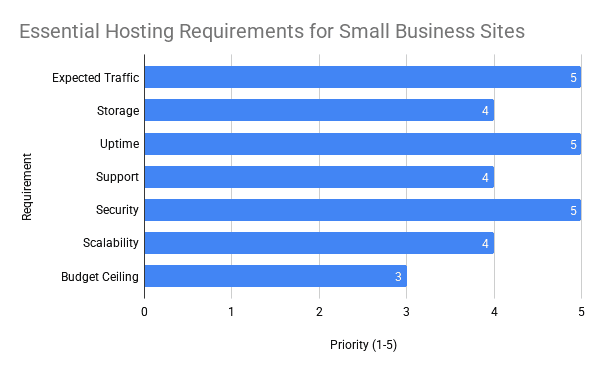
Before comparing plans, identify your non-negotiable requirements. Include expected traffic, storage, email needs, software, and backup frequency. Then confirm who handles migration and recovery. Also ask whether support can diagnose WordPress problems. Clear answers reveal the true value of a plan. Vague answers usually signal future frustration.
- Managed WordPress updates and server maintenance
- Daily off-site backups with a clear restoration process
- SSL certificates and practical security monitoring
- Server-side caching and modern PHP support
- Responsive technical support from people who can troubleshoot
- Simple pricing without surprise resource charges
How does hosting speed affect local leads and SEO?
Slow hosting delays every important interaction. A visitor waits longer to see your service, price, or phone number. That delay creates doubt before your sales message appears. Mobile users often feel the problem first. They may have weaker connections and smaller processors. So every avoidable server delay carries more risk.
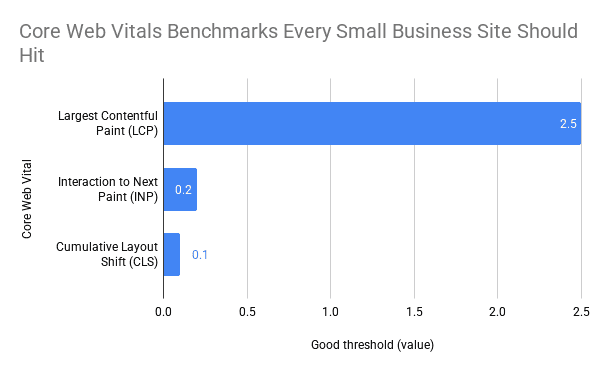
Google measures real user experience through Core Web Vitals. Its Core Web Vitals documentation defines good performance as Largest Contentful Paint within 2.5 seconds, Interaction to Next Paint within 200 milliseconds, and Cumulative Layout Shift at 0.1 or less. Hosting directly influences server response and page delivery. However, design and code also affect these results. A faster server cannot repair every website problem. It provides the foundation for meaningful improvements.
Search rankings depend on more than speed. Content relevance, links, local signals, and technical SEO all matter. The Ahrefs overview of SEO fundamentals explains how these elements work together. Yet weak hosting can undermine the entire system. Crawlers encounter errors, visitors abandon pages, and tracking becomes unreliable. Better hosting removes those avoidable obstacles.
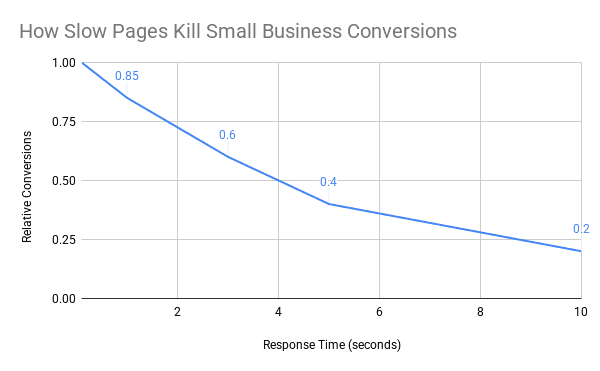
Conversions suffer when pages respond slowly. A visitor who cannot open a service page cannot request an estimate. Someone who sees an error may never return. Even small delays can interrupt the decision process. The Nielsen Norman Group identifies one second as an important response-time limit for maintaining a user’s flow. Faster feedback keeps people engaged. That engagement creates more chances to convert.
Start with evidence before blaming your hosting provider. Test several important pages on mobile and desktop. Check the homepage, main service pages, and contact page. Then review server response time and Core Web Vitals. You can test your WordPress site speed using a repeatable process. Consistent testing separates hosting delays from page-level problems.
A web hosting Bakersfield provider should explain the test results clearly. High server response times may point to overloaded infrastructure. Slow LCP may involve hosting, images, or render-blocking code. Poor INP often comes from scripts and plugins. Therefore, diagnosis matters more than one performance score. Fix the largest bottleneck first. Then test again and confirm the business impact.
What do website performance benchmarks mean for a small local business?
Performance reports can feel abstract. Your customers do not discuss LCP while requesting an estimate. They simply decide whether the website feels dependable. A quick page creates momentum and confidence. A slow page introduces hesitation. For a local business, that brief moment can determine who receives the call.
Page weight creates another common problem. The HTTP Archive page weight reports show that median web pages exceed two megabytes across mobile and desktop. Large images and excessive scripts drive much of that weight. Hosting must deliver those files efficiently. However, it should not excuse an oversized website. Strong results require both good infrastructure and lean pages.
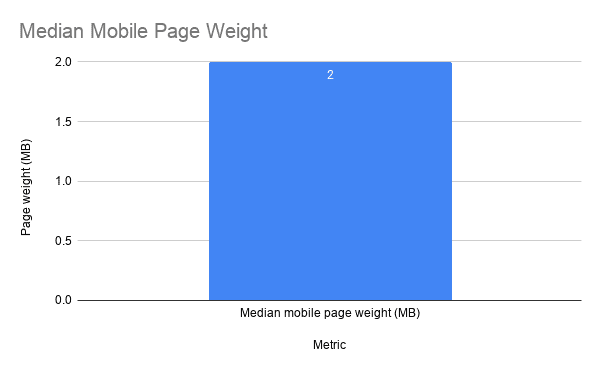
Consider what two megabytes means for a mobile customer. The visitor may use a congested network outside their home. Every image, font, and tracking script adds another request. Meanwhile, the customer wants one simple answer. They need to know whether you solve their problem. Remove anything that delays that answer.
Core Web Vitals provide useful operating targets. Aim for LCP at or below 2.5 seconds. Keep INP under 200 milliseconds. Hold CLS at 0.1 or lower. These numbers do not guarantee a conversion. Still, they help identify experiences that may frustrate users.
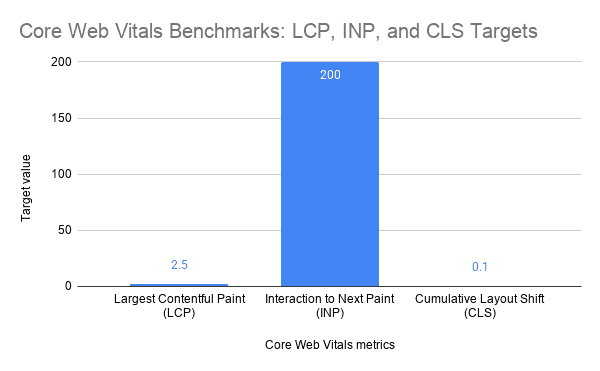
For small businesses, the interpretation is straightforward. Speed supports trust, and trust supports action. Stable pages make forms and buttons easier to use. Reliable hosting also prevents lost visits during traffic spikes. Therefore, performance protects marketing spend from waste. It helps more visitors reach the point of contact.
Do not chase perfect scores without context. A one-point improvement means little if the quote form remains broken. Start with pages that attract search traffic or paid clicks. Then improve their loading, stability, and lead path. Track calls, forms, and booked appointments afterward. Business outcomes should guide every technical decision.
- LCP: How quickly the main visible content appears.
- INP: How quickly the page responds to a visitor’s action.
- CLS: How much the page moves unexpectedly while loading.
- Server response time: How quickly hosting begins sending page data.
- Conversion rate: How often visitors complete a valuable action.
Which hosting setup fits a small or service-based business?
Many small businesses start on shared hosting. It costs less because many websites share one server. That arrangement can work for a basic brochure site. Problems begin when accounts compete for limited resources. One busy or poorly secured site may affect others. Performance can then change without warning.
Managed WordPress hosting fits businesses that rely on WordPress but lack internal technical staff. The hosting environment supports WordPress caching, updates, and security. Support teams should also understand common plugin and database problems. That knowledge shortens troubleshooting time. It reduces pressure on the business owner. More importantly, it keeps lead-generating pages available.
A virtual private server offers more control and dedicated resources. However, it also requires active administration. Updates, firewall rules, backups, and monitoring need an owner. An unmanaged server may look inexpensive initially. Then maintenance hours and emergency repairs increase the real cost. Choose it only when someone can manage it properly.
E-commerce and high-traffic websites need stronger resources. Product searches, checkout sessions, and account features require more processing. In addition, traffic can rise sharply during promotions. Hosting should scale without slowing the checkout. Security and backup frequency also become more important. Lost orders quickly outweigh small hosting savings.
Most Bakersfield service companies need a balanced setup. Managed WordPress hosting usually provides enough speed, support, and security. Businesses with heavy applications may need custom resources. Those considering a change can review faster WordPress hosting options and compare the underlying performance features. Do not choose based on storage alone. Processing capacity and support quality matter more.
The best web hosting Bakersfield setup follows business demand. A growing contractor needs reliable lead forms and room for traffic growth. A medical office needs careful security and dependable recovery. A restaurant needs fast menus and mobile directions. Different websites create different workloads. Your hosting should reflect the work your site performs.
What reliability, security, and support features really matter?
Downtime prevents customers from contacting you. It also wastes traffic from search, social media, and paid campaigns. An uptime promise sounds reassuring, but measurement matters. Ask how the provider monitors availability. Confirm how quickly the team responds to incidents. A guarantee without active monitoring offers little protection.
Backups provide the last line of recovery. Daily backups suit many local business websites. Busy stores may need more frequent copies. The provider should store backups away from the main server. Otherwise, one server failure could affect both copies. Always confirm how long restoration takes.
Security requires several layers. SSL protects data in transit, but it does not stop every attack. Strong hosting also uses firewalls, malware detection, login protection, and software updates. WordPress sites need careful plugin management too. An abandoned plugin can create a serious opening. Regular maintenance reduces that exposure.
Support quality becomes obvious during a failure. Basic support may only confirm that the server runs. Useful support investigates why the website remains slow or unavailable. The team should read logs and identify resource problems. It should also explain the next step plainly. Clear ownership prevents hours of confusion. Fast escalation protects customer access.
Hosting and maintenance often overlap, but they are not identical. Hosting maintains the environment that delivers your website. Maintenance covers WordPress updates, plugins, testing, and site-level repairs. Some plans combine both responsibilities. Others leave maintenance entirely to the customer. Before buying, compare WordPress maintenance plans and identify any coverage gaps.
Reliable web hosting Bakersfield should reduce operational risk. It should not create another system you must constantly supervise. Look for clear backup schedules, written security practices, and accountable support. Then ask how the provider handles a compromised site. The answer should include containment and recovery steps. Preparation matters more than reassuring language.
- Automated uptime and server-resource monitoring
- Off-site backups with tested restoration procedures
- Malware scanning and practical firewall controls
- Current PHP, database, and WordPress support
- Clear response times for urgent issues
- Direct help during outages, migrations, and security incidents
How can you compare hosting prices and migrate without costly downtime?
Start with total cost, not the advertised first-year rate. Introductory prices often increase at renewal. Some plans also charge for backups, security, migration, or email. Those additions change the real monthly cost. Repair work adds another hidden expense. Put every expected charge into one comparison.
Next, compare resource limits. Review storage, bandwidth, memory, processing power, and visitor allowances. Also check what happens when the website exceeds a limit. Some providers slow the account immediately. Others charge overage fees or recommend an upgrade. Clear policies make future budgeting easier. Hidden limits create avoidable emergencies.
A careful migration should not interrupt normal business. First, copy the website into the new environment. Then test pages, forms, tracking, and integrations. Confirm that backups work before changing DNS. Lowering DNS time-to-live in advance can shorten the transition. Keep the old account active during verification. Cancel it only after the new setup remains stable.
Email needs separate attention. A website migration does not always include business mailboxes. Document every account, forwarding rule, and DNS record first. Then verify incoming and outgoing messages after the change. Missing email can hide new customer inquiries. Therefore, assign clear responsibility before migration begins. Never assume the web host handles it automatically.
After launch, monitor the website for several days. Test forms and phone-number tracking again. Review speed, errors, and server logs. Also watch organic traffic and conversion data. A successful move should improve stability without disrupting measurement. If results decline, investigate quickly.
The right web hosting Bakersfield decision should protect leads and reduce wasted work. Price matters, but predictable performance matters more. If you cannot identify what is slowing your site, a structured review can locate the bottleneck. You can schedule a website strategy consultation to assess hosting, speed, and conversion risks. The purpose is clarity, not pressure. A sound diagnosis makes the next decision easier.
What are the key takeaways for choosing Bakersfield web hosting?
- Cheap hosting can become expensive. Downtime, slow pages, and repair work often erase the initial savings.
- Performance affects revenue. Fast, stable pages help more visitors reach forms, phone numbers, and booking tools.
- Core Web Vitals provide useful targets. Aim for LCP within 2.5 seconds, INP within 200 milliseconds, and CLS at 0.1 or less.
- Management has real value. Backups, monitoring, security, and WordPress support reduce technical risk.
- Measure before migrating. Test server response, important pages, forms, tracking, and mobile performance first.
Frequently asked questions about web hosting near Bakersfield
What is affordable web hosting for a small business?
Affordable business hosting balances cost with speed, security, backups, and reliable support. It should reduce technical risk without charging for resources your website does not need.
Does my hosting server need to be located in Bakersfield?
No. A well-managed regional server with caching and efficient routing can deliver excellent local performance. Server quality, configuration, and network reliability matter more than a Bakersfield street address.
Can changing web hosting improve SEO?
Better hosting can improve uptime, server response, crawling, and Core Web Vitals. However, hosting cannot replace strong content, local SEO, technical fixes, and relevant links.
How much should small-business hosting cost?
Pricing depends on traffic, storage, management, backups, and support. Compare the full renewal cost and any charges for migration, security, maintenance, email, or resource overages.
How do I know whether my current host is too slow?
Test multiple pages and review server response time, LCP, INP, uptime, and error logs. Repeated delays across different pages often indicate hosting or server-resource problems.
Is your hosting helping the business or quietly holding it back?
Your website has one job. It must help the right customer take the next step. Hosting either supports that process or gets in the way.
A reliable setup loads pages quickly, keeps forms working, protects business data, and gives search engines consistent access. It also removes technical distractions, so you can focus on customers instead of server problems.
If your site feels slow, unstable, or difficult to manage, do not guess. Measure the problem, identify the bottleneck, and fix the issue that costs the business money. The right hosting decision should lead to faster pages, fewer failures, and more qualified inquiries.
The important question is not whether you can find cheaper hosting. It is whether your current hosting helps more visitors become customers.
🎥 Featured WordPress Video
🏆 Top 3 Most Watched Videos

Ray Eason is a WordPress developer and SEO strategist with over 20 years of experience helping businesses build fast, secure, and high-converting websites. As the founder of Reason Hosting, he specializes in WordPress performance, local SEO, and lead generation for small to mid-sized businesses, including real estate and dental practices. His focus is simple, help businesses rank higher, load faster, and convert more visitors into customers.
Need help with your website? Get a free SEO audit or request a custom quote.
About Reason Hosting
We help Bakersfield businesses grow with WordPress design, SEO, hosting, and performance optimization. Learn how to rank higher, load faster, and convert more visitors into leads.
Get a Free WordPress SEO Audit
Get WordPress Growth Tips
More from our blog
See all posts





Recent Posts
- Is a WooCommerce Development Company Near Me Affordable? October 10, 2026
- Where Can You Buy WordPress Web Hosting With Free SSL? September 17, 2026
- Looking for Affordable Web Hosting Bakersfield? August 24, 2026